
Instead of blurring bystanders we remove them from the footage we publish: find every person in every frame, leave the person we are capturing untouched, fill each bystander’s area with background, then check the output strictly on every frame and review what is left by eye. On the 15 clips from our October 17 capture that appear on public pages, 180.7 of 221.5 seconds passed and 40.8 seconds (18%) were cut where the fill left visible traces. An automatic check of all 4,517 remaining frames (25 fps) flagged 12 spots; we looked at each one, and none was a person. Our first version passed a looser check but missed faint, distant people and a person standing in deep shade.
01Why blur did not work
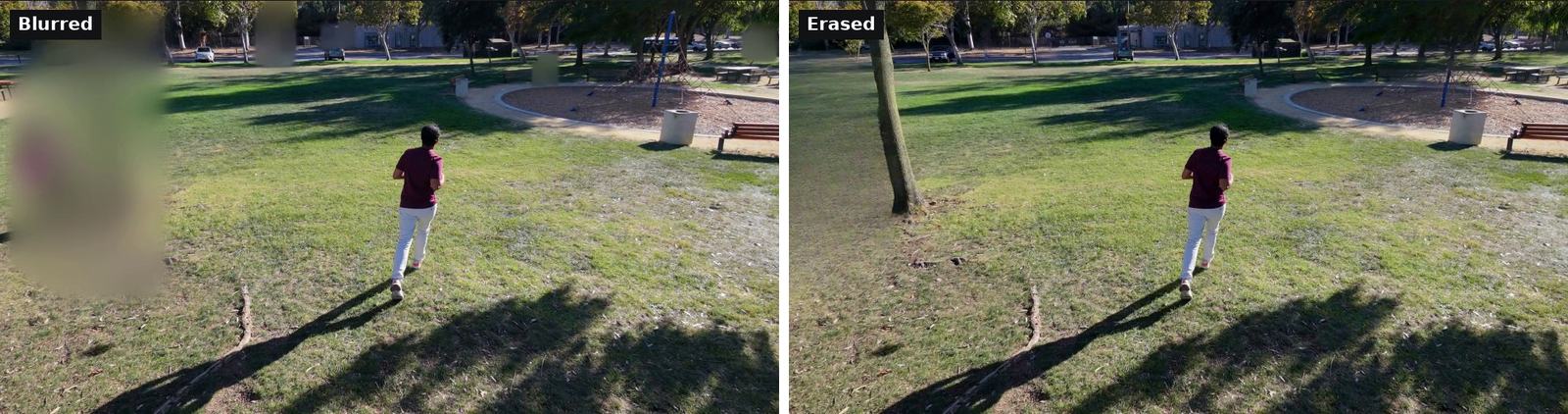
We film people moving in real places: parks, paths, picnic areas. Other people are there too, and they did not agree to appear in our videos. Our first public pages blurred them. Looking at the results, we found four problems.
- It looks bad. A soft box over a third of the frame draws the eye more than the person who was there.
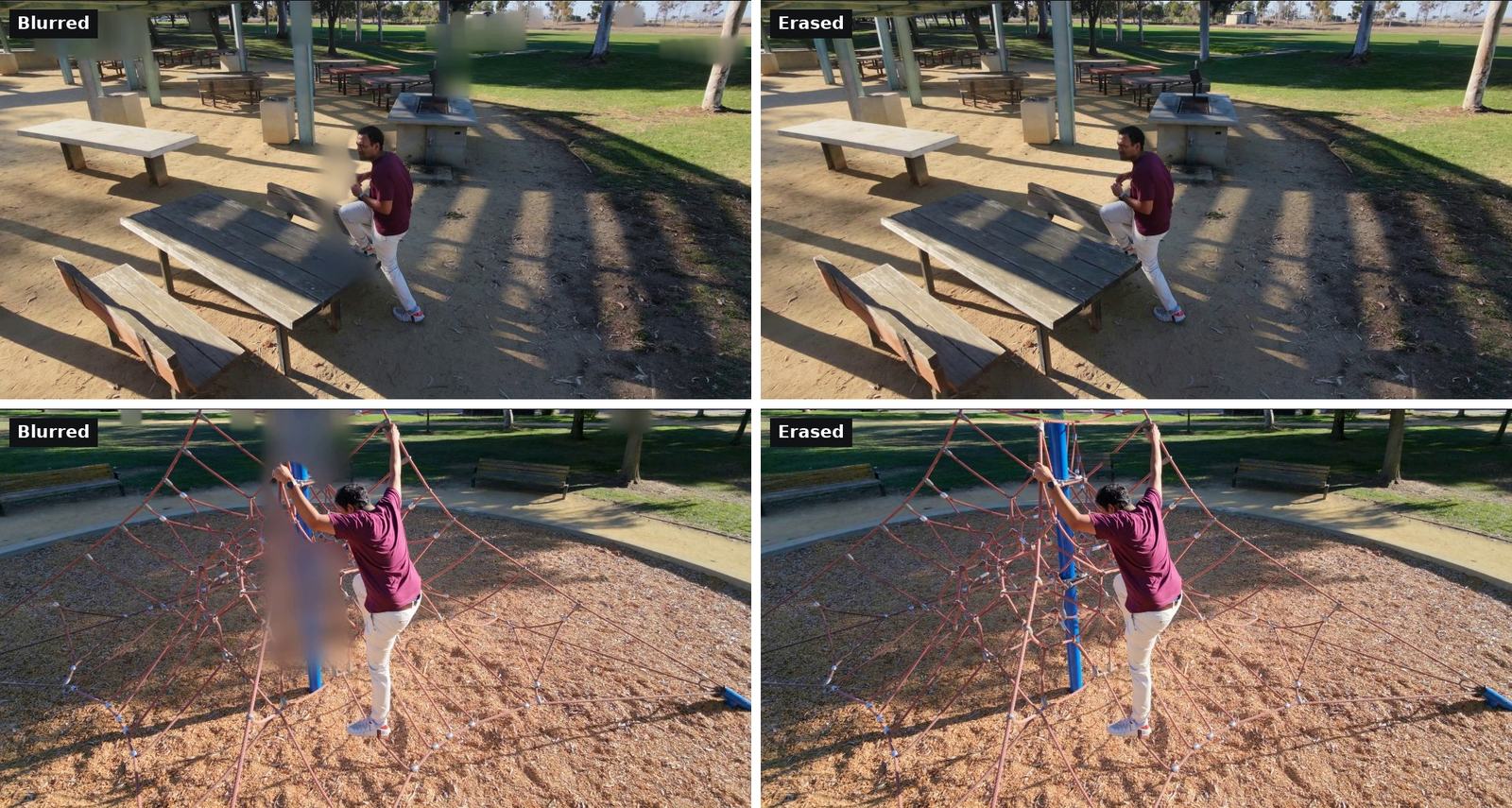
- It hits the subject and the scene. When a bystander stands behind the person we are filming, the blur box covers part of our subject. On a climbing clip it covered the pole and rope net, which are part of what we measure.
- A blurred person is still a shape. Height, clothing colour and where they stood remain visible.
- It only covers what is detected. A faint figure far away that the detector misses is left sharp. This last problem applies to erasing as well, and it is where we made our mistake (below).
02What we do instead
At a high level:
- Find every person in every frame, including small and faint ones.
- Leave the subject untouched. The person we are capturing, who agreed to capture and publication, is tracked and never edited.
- Fill each bystander’s area with background, taken where possible from other moments of the same clip, when the drones saw the ground behind that person.
- Check the output strictly. The finished copy is searched again for people on every frame, and faint detections are flagged as well as confident ones.
- Review every flag by eye, and cut any stretch where the fill leaves a ghost or smear, rather than publish it or blur it.
The same process covers the images that texture our 3D replays. The erase and the cuts apply only to the copies we publish: our 3D measurements are made from the original footage, so erasing changes no number on this site. The tools we use are open source, with code and weights under permissive licences.
03Results on our public clips
| Measure | Value |
|---|---|
| Clips that appear on public pages | 15 (from the October 17 capture) |
| Footage kept | 180.7 of 221.5 s (82%) |
| Footage cut because the fill left a visible trace | 40.8 s (18%), in 6 clips |
| Frames checked after the erase | all 4,517 kept frames (25 fps), by an automatic check |
| Flags from the strict check | 12, each reviewed by eye: smears on cars, benches, trees and the rope net; none a person |
| Changes to the subject | none |
The cuts are concentrated where the background is busy and people stay a long time, such as a crowded picnic shelter behind the rope net. When people occupy the same patch of background for most of a clip, there is no clean view of it to fill from, and the result is a smear. Open lawns and slopes fill cleanly.
04What we learned
Our first erased version passed the check we ran on it, which sampled every third frame and flagged only confident detections. A stricter re-check, run on every frame and flagging faint detections too, then found remnants in most clips: faint figures far away that were only a few dozen pixels tall, half-erased outlines, and one person standing in deep shade. We withdrew the erased media, used the earlier blurred media for a few hours, and redid the erase with a stricter rule for what to remove, followed by the strict check and a review by eye.
The lesson is mostly about the check. A check that samples frames or trusts only confident detections will pass footage that a person would not. It has to look at every frame, flag what it is unsure of, and end with a person looking at each flag.
05What we still do not do
- Busy scenes. Where people stay in a crowded background for most of a clip, or pass close to the person we capture, the fill leaves traces. We cut those segments rather than publish them.
- Full automation. Some steps still need a person: marking structures the detector mistakes for people, such as the climbing pole and ropes, reviewing flags and choosing where to cut.
- Shadows and reflections. A removed person’s shadow is part of the area we fill, but a long shadow or a reflection can survive.
- People inside vehicles. In one clip, drivers on a far road (10 to 20 pixels tall, behind windscreens) are left in, because erasing them garbled the moving cars. We do not erase vehicles or number plates.
- Seamless fills. Fills can show seams or soft patches on close inspection.
- Live video. The erase runs after capture, not during it.
- Consent. Erasing is not consent. The person we capture agrees to capture and publication. Bystanders still appear in the original footage; it is not published, and erasing protects what we publish, not what we record.
Questions
Why erase bystanders instead of blurring them?
In our drone footage, blur boxes covered large parts of the frame, overlapped the person being captured and objects in the scene, and still showed each bystander’s shape and clothing colour. Removing bystanders and filling in the background avoids all three, as long as every frame is checked afterwards.
How do you check that every bystander was removed?
The published copy is searched for people again on every frame, flagging faint detections as well as confident ones, and every remaining flag is reviewed by eye. On our 15 public clips that check covered 4,517 frames and flagged 12 spots, none of them a person. Stretches where the fill leaves a visible trace are cut.
What goes wrong when erasing people from video?
Faint, distant people get missed, and busy backgrounds where people stay for a long time fill badly. Our first version passed a check that sampled frames and flagged only confident detections, but still had faint remnants in most clips; a check of every frame that also flags faint detections found them. On busy scenes we cut the footage rather than publish smears: 18% of our public clip time.
Does removing bystanders change the motion capture data?
No. The erase applies only to the copies we publish. The 3D body, cameras and ground are measured from the original footage, and the person being captured is never edited.